Create, edit, and delete an app
Prerequisites
- You are signed in to a tenant.
- You have the App designer permission.
Create an app
- In the app overview, enter Design mode ().
- Click the red plus () to open the create dialog.
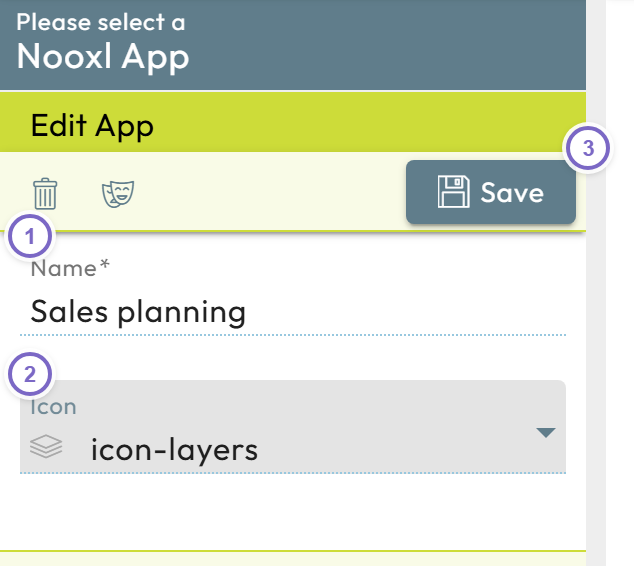
- 1 Enter an app name.
- 2 Choose an icon.
- 3 Click Save.
- 4 Clone the existing app
Leave Design mode, then open your app by clicking its entry.
note
If your account allows only a single app, Nooxl Apps may open it directly. Click the app name in the left navigation to reach it.
Edit an app
- In the app overview, enter Design mode.
- Click the edit button next to the app you want to change.
- Adjust the name and icon, then click Save (or close with x to cancel).
Copy / clone an app
You can copy an app including all of its content and data — useful, for example, to set up a training environment separate from production.
- Enter Design mode in the app overview.
- Click the clone icon next to the app to open the clone dialog.
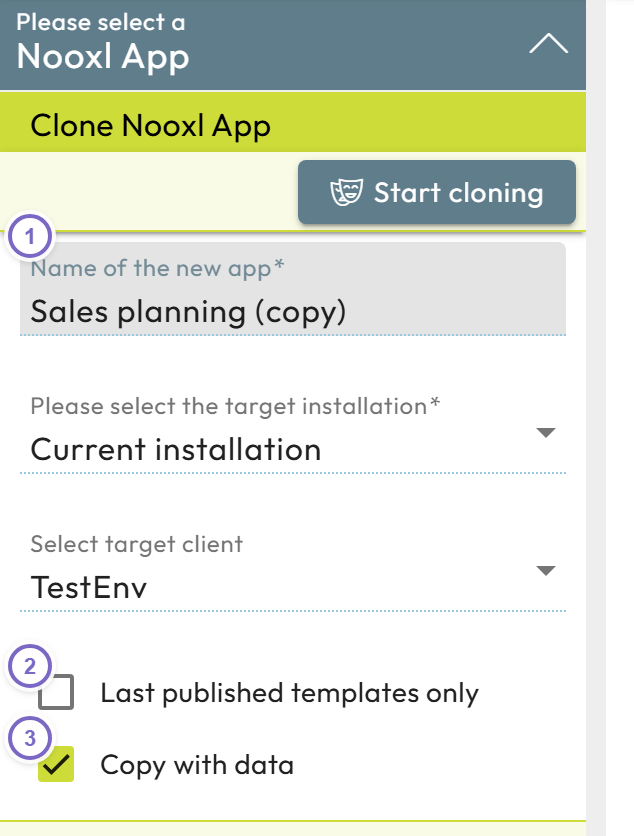
The clone dialog offers these options:
| Field | Meaning |
|---|---|
| Instance connection number (1 = current) | Set a different target instance (for example production → test). The number comes from the target instance's configuration file. |
| Target tenant (empty = current) | The ID of the target tenant, taken from the browser URL, if copying to another tenant. |
| Default owner email (empty = self) | The user who becomes the owner of the copy; defaults to you. |
| Only with current spreadsheets | Copy only the latest version of every model. |
| Copy with data | Copy all datasets as well. |
note
Data label categories, data labels, and collections are copied even when Copy with data is disabled.
A progress indicator appears while the copy runs in the background.
Delete an app
- Enter Design mode in the app overview.
- Click the edit button next to the app, then the trash can icon.
- Confirm the deletion.
warning
Deleting an app removes all of its models and data. Depending on the amount of data the app is deleted in the background and can take several minutes or hours.