5. Read external data
A model can read values stored in another model — useful for shared assumptions or reference data.
- In the source model, note the cell entry name of the cell storage value you want to read.
- In the target model's Design mode, add a cell storage to the target cells and turn on Advanced mode.
- Set the cell value type to Data borrowing, bind the owner model / cell storage, and set Data action = Read.
- Reload and confirm the values appear.
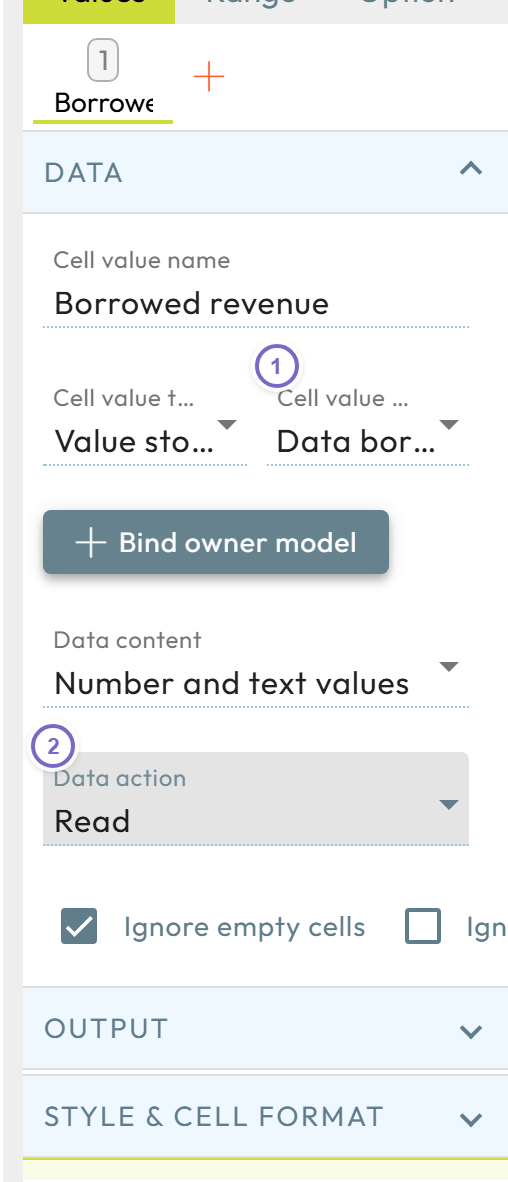
- 1 Set Cell value type to Data borrowing (under Value storage).
- 2 Click Bind owner model and set Data action = Read.
note
Read a property that was actually stored at the source — reading a number fails if only text was saved.
For a full external system import, see Import data via template; to read an external API, see Data query.
Next: Permissions