Data query
A data query retrieves data from an external source (for example a database) so it can be used in your Nooxl App. A query is built from a connection, one or more commands, and optional parameters.
note
In older documentation and the API this is a bxlink. To bring the query result into a model's cells, use a query section.
Prerequisites
- A Nooxl App is open and Design mode is active ().
- You have the external connection details.
Create a data query
- Open Data integration and enter Design mode.
- Create a new data query and choose its connection type.
- Enter the connection string (or pick a preset connection from the configuration file).
- Save — then add one or more commands and, if needed, parameters via the button on the query in the tree.
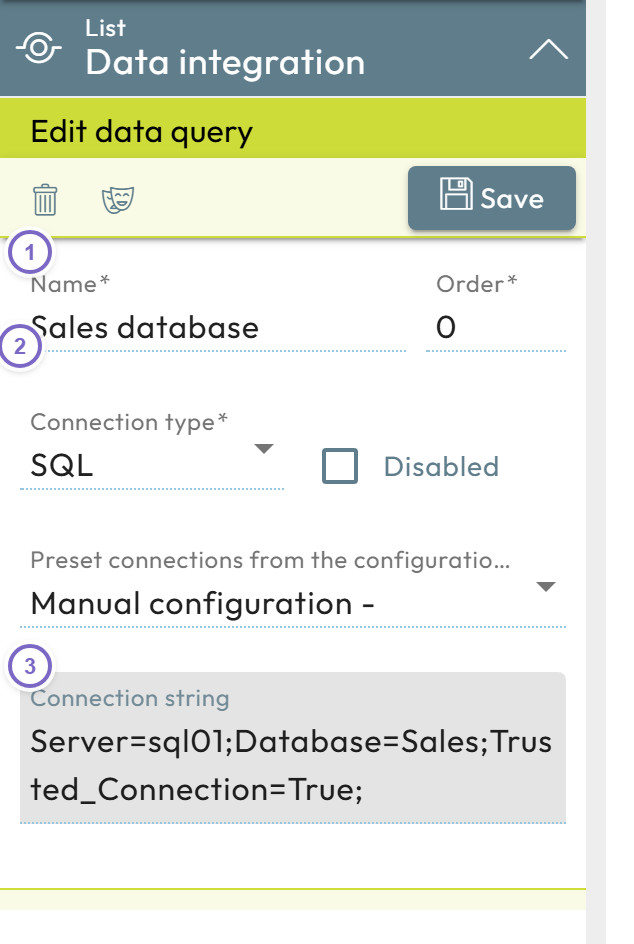
- 1 Enter a name.
- 2 Choose the connection type.
- 3 Enter the connection string.
Query parts
| Part | Fields |
|---|---|
| Data query | Name, connection type, order. |
| Command | Name, command type, command text, timeout (seconds). |
| Parameter | Name, order, and options: allow null values, optional, not modifiable. |
note
Parameters let a query react to the current dataset — for example passing the selected labels as filter values into the command.