Query section
A query section reads data from another source — another model or an external data query — into the cells of the current model.
note
In older documentation and the API this is a bxlink markup (MarkupBxlink). To read plain cell values from another model, a cell storage section with an EXTERNAL value is often enough; use a query section when the source is an external data query.
When to use
- Pull reference data maintained elsewhere (another model) into this model.
- Bring external data (defined as a data query) into cells, optionally parameterized by the current dataset.
Step by step
- In the model's template Design mode, select the target cells and add a query section to the section anchor.
- Choose the source — a model/cell or a data query — and map it to the target range.
- Set any parameters the query needs (for example values from the current dataset).
- Configure triggers that re-run the query (for example on open or on value change), and save.
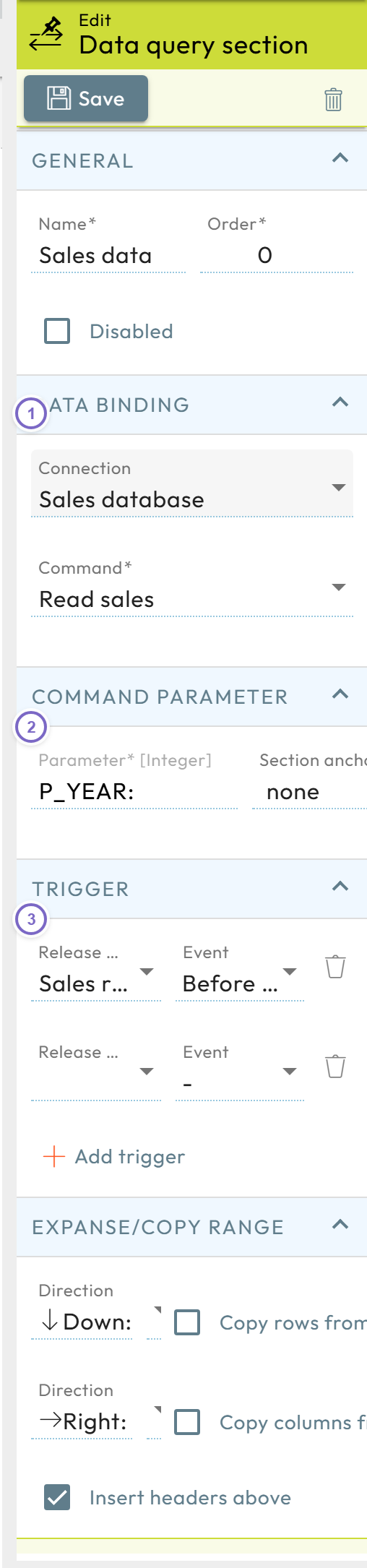
- 1 Choose the source under Data binding: the data query (Connection) and its Command.
- 2 Map the command parameters (for example values from the current dataset).
- 3 Configure the triggers that re-run the query.