Tab view section
A tab view section defines what users see in Work mode: which cells appear as a tab page, which rows and columns are frozen, and what is hidden dynamically.
note
In older documentation and the API this is a region markup (MarkupRegion). The day-to-day configuration of tabs and views is described from the model side in Tabs and views; this page focuses on the section type.
What it controls
- Tab page — the set of cells shown as a tab. As soon as you create custom tabs, the default per-sheet tabs are replaced.
- Freeze panes — fix a number of left columns and top rows (counting only the cells visible in the tab).
- Dynamic visibility — show or hide the whole tab via a visibility markup, and hide
individual rows/columns based on
-1values produced by Excel logic in a designated hide column/row.
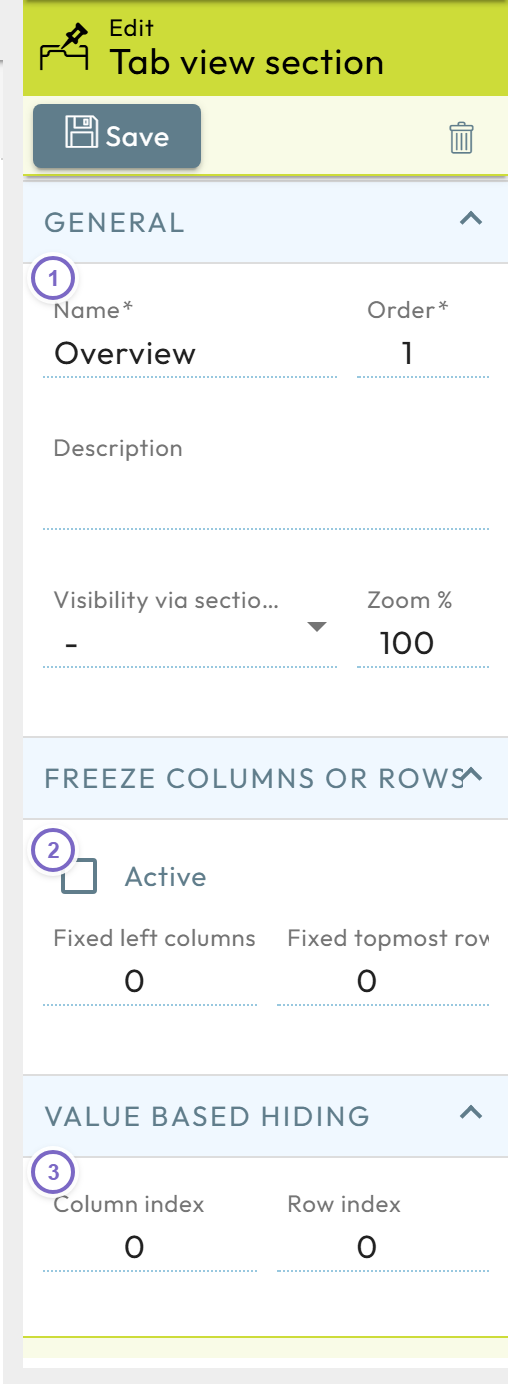
- 1 Name and order of the tab.
- 2 Freeze panes (fixed columns/rows).
- 3 Value-based hide (hide column/row).