Control Nooxl Apps with a REST API
A REST API (Representational State Transfer Application Programming Interface) is an interface that defines the rules and conventions for exchanging data between different software applications over the internet. The Nooxl REST API uses the JSON format to exchange data. Using the REST API makes it easy to integrate with third-party services (such as Microsoft Power Automate, Zapier, Zoho Flow, IFTTT, HubSpot Operations Hub, ...).
Data exchange between Nooxl Apps and automations
Within Nooxl Apps, most work processes are automated through spreadsheets, for example calculating spreadsheet models or entire Nooxl Apps, importing, exporting, copying, or saving data, and preparing cube data. A REST API is all that is needed to control these automation processes from the outside. See the Nooxl documentation for further capabilities of the Excel-compatible Nooxl models.
What the "model calculate" REST API does
The "model calculate" REST API opens a selected Nooxl model with a selected dataset in Nooxl Apps, enters data, optionally saves it, and returns calculated data from the model. The following steps take place in Nooxl Apps when the "model calculate" REST API is called:
1. Authorization
Part of the REST URL is a shortened Nooxl App GUID. When the REST API is called, an API token is sent along, which is used to determine the user from a local sign-in and to check their assignment to the Nooxl App. (No further permission to open the Nooxl App is needed.)
2. Selecting the Nooxl model
Part of the JSON body of the API call is either the model name or the model id, by which the spreadsheet model is determined. It is checked whether the user of the REST API has permission in Nooxl Apps to open the model.
3. Selecting the dataset
The dataset in the Nooxl cell storage is determined via the names of the data labels or their ids. The order of the data labels in the API call must match the order in Nooxl Apps.
4. Loading the model with data
It is checked whether the user has a read right on the dataset. The current version of the model is opened with the selected dataset and calculated.
5. Entering values
If an input area was passed when the API was called, the input values are entered into the spreadsheet cells of the model. Beforehand it is checked whether the cell is an input cell (input color) and whether actions must be triggered by the input. The model is calculated.
6. Saving the data
If the save option is set, it is checked whether the user has a write right on the dataset, and the data is written to the cell storage.
7. Returning values
For the requested ranges, the values are read from the model and added to the response. The model is closed and the response is sent.
Using the "model calculate" REST API
The complete OpenAPI definition (Swagger JSON) of the REST API can be downloaded here.
Reading parameters from the Nooxl App
The following usage example shows the "model calculate" REST API with matching values for the Nooxl App "API-Demo" with a spreadsheet model "Cash flow" in our demo environment.
On the demo app apps-demo.nooxl.com you first reach the standard demo app with an automatic sign-in. Please first sign out of the "Demo Auto Login" sign-in using the menu at the top right, and then sign in again. Sign-in (read-only access) is done with:
Login name: API-Tester
Password: ivtP@t>UN>KF9
Without signing in again you remain in the standard demo environment and will not find the required app "API-Demo".
After you have selected a model with datasets, the parameters for the selected elements become visible in the URL:
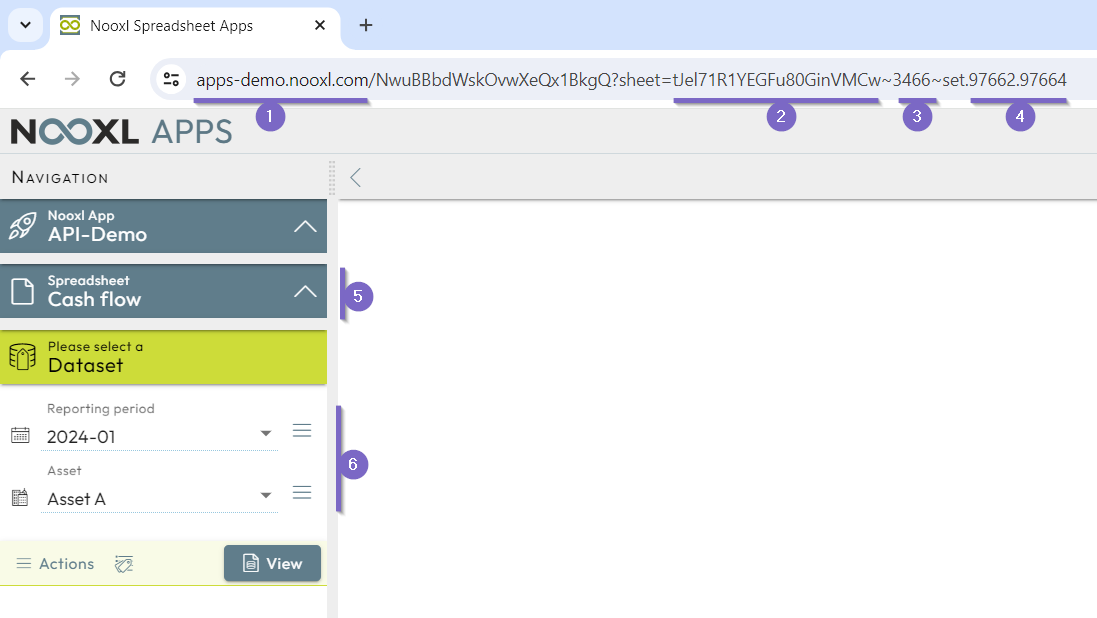
From the URL shown in the Nooxl demo app, the following parameters, needed later for the API call, can be read:
- 1 This is the host name of the Nooxl web server (and not the associated Nooxl API server! see below).
- 2 This is the app id
nooxlAppNuidwith the valuetJel71R1YEGFu80GinVMCw. - 3 This is the model id
modelIdwith the value3466. - 4 The dataset selections
modelSelectionshave the label idsdataLabelId97662and97664. - 5 As an alternative to the model id, the model name
"Cash flow"can also be used. - 6 As an alternative to the label ids
dataLabelId, adataLabelNamewith"2024-01"and"Asset A"can also be used.
There is no name alternative for the app id.
Parameters in the REST API URL
The "model calculate" REST API is called with the following parameters:
https://{nooxlApiHostName}/api/v1/app/{nooxlAppNuid}/ModelCalculate
The name of the Nooxl API server nooxlApiHostName depends on the installation and is
https://ncs-demo.nooxl.com for our demo example.
This means the parameters are inserted into the URL as follows:
https://ncs-demo.nooxl.com/api/v1/app/tJel71R1YEGFu80GinVMCw/ModelCalculate
Authorization via API token
When calling the REST API URL, an Authorization header with the access token
Bearer {token} must be sent along. The token is obtained beforehand by calling the
REST API "authenticate".
Parameters in the REST API body
In addition to the parameters mentioned above, the body also sets the inputs dataInputs,
outputs dataOutputMarkupNames, and options modelOptions. The markup names markupName
are used for the inputs and outputs. These are only visible to authorized users in design
mode and are not available with the demo sign-in.
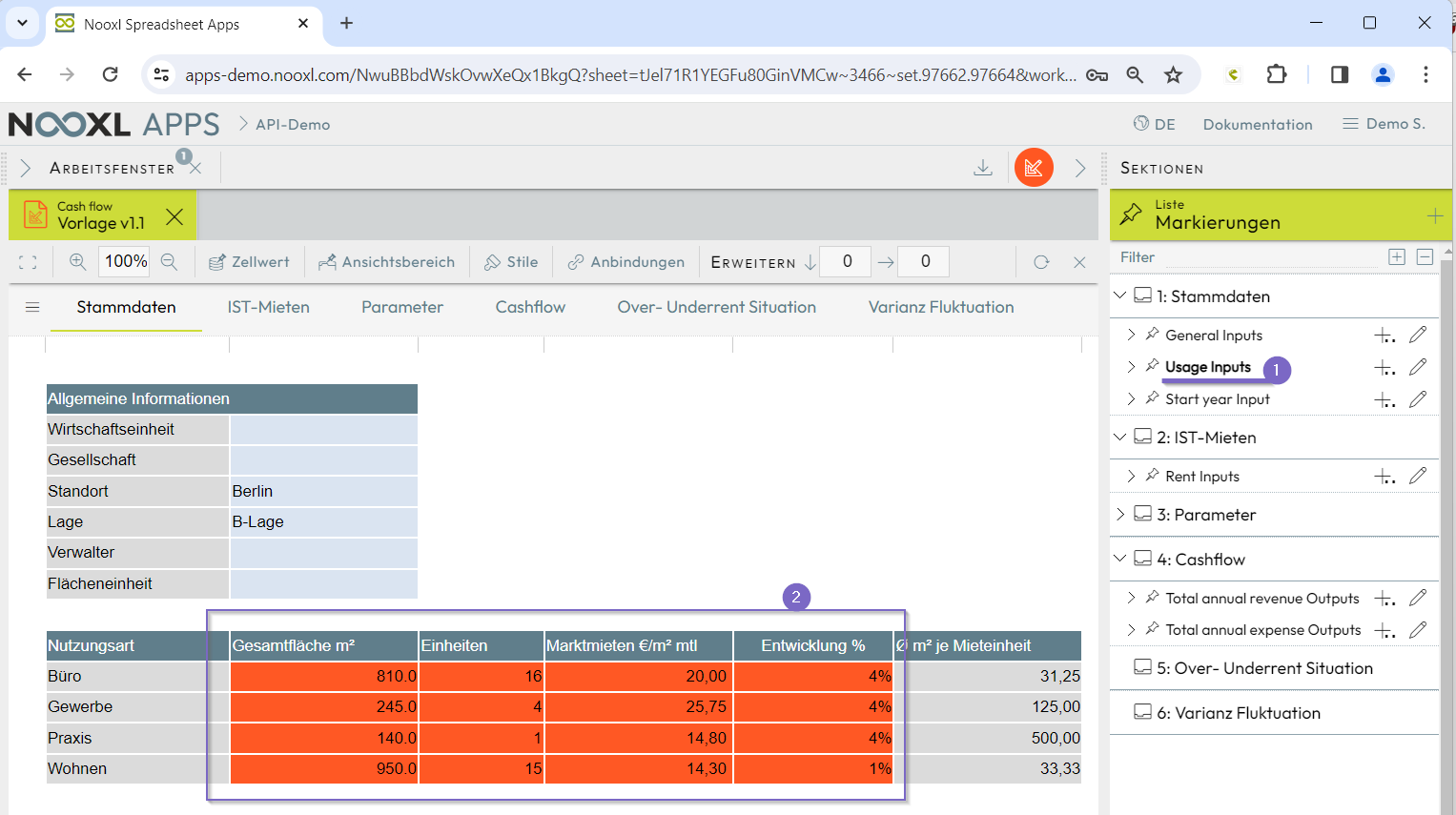
- 1 On the right, in the list of markings, you find the markup names that can be used as input or output.
- 2 When a marking is selected, the range is highlighted in red in the work window.
For the inputs, the input values cellValues are also passed as a two-dimensional array of
rows of columns. For outputs, only the names are given. Our example body then looks as
follows:
{ "modelName": "Cash flow",
  "modelSelections": [
    {"dataLabelName": "2024-01"},
    {"dataLabelName": "Asset A"}
  ],
  "dataInputs": [
    {"markupName": "Usage Inputs",
     "cellValues": [
        ["810","16","","20.00","4%"],
        ["245","4","","25.75","4%"],
        ["140","1","","14.80","4%"],
        ["950","15","","14.30","1%"]
      ]
    },
     {"markupName": "Rent Inputs",
     "cellValues": [
        ["20.11","3.00%"],
        ["21.00","2.00%"],
        ["34.70","1.50%"],
        ["15.40","5.00%"]
      ]
    },
    {"markupName": "Parameter Inputs",
     "cellValues": [
        ["1.84%"],["7.79%"],["7.53%"],["466.81"],["1.00%"],["35.00"],["2.00%"],["3.15"],["18.75%"],["2.00%"],["3.73%"],["4.29%"],["1.49%"],["0.00%"],["2.50"],["1.50%"],["5.00"]
      ]
    }
  ],
  "dataOutputMarkupNames":  [
    "Total annual revenue Outputs", "Total annual expense Outputs"
  ],
  "modelOptions": {
    "saveModel": true
  }
}
In the options modelOptions, "saveModel": true saves the model (given sufficient
permission).
On the demo app, the user "API-Tester" has no save permission.
REST API result response
After calling the REST API, Nooxl Apps returns a response body on success. In case of an error, an error message is returned instead. The response body for our demo request looks as follows:
{
    "dataOutputs":[
        {
            "markupName":"Total annual revenue Outputs",
            "cellValues":[
                ["477,715.82","493,584.47","502,651.10","512,028.82","521,734.43","531,788.61","542,213.04","553,030.50","564,264.85","575,941.13"]
            ]
        },
        {
            "markupName":"Total annual expense Outputs",
            "cellValues":[
                ["221,563.00","223,969.94","226,453.86","228,968.19","231,513.78","234,091.03","236,700.40","239,342.33","242,017.28","244,725.71"]
            ]
        }
    ],
    "errorCodes":[]
}
In the outputs dataOutputs we see the output values cellValues passed as a
two-dimensional array of rows of columns.