Using Microsoft Power Automate to control your Nooxl Apps
Within Nooxl Apps, work processes for spreadsheet models can easily be automated, such as importing, exporting, or copying data, calculating spreadsheet models or entire Nooxl Apps, and preparing cube data. To control these automation processes from the outside, Nooxl Apps offers a REST API that makes it possible to control Nooxl Apps from other applications. One of these applications is Microsoft Power Automate.
What is Microsoft Power Automate?
With Microsoft Power Automate, users can create automation rules, so-called "flows", without having to write code, to automate repetitive tasks such as email notifications, data synchronization between applications, or complex business processes. Microsoft Power Automate is part of the Microsoft Power Platform, which also includes Power BI, Power Apps, and Power Virtual Agents.
Power flow demo for Nooxl
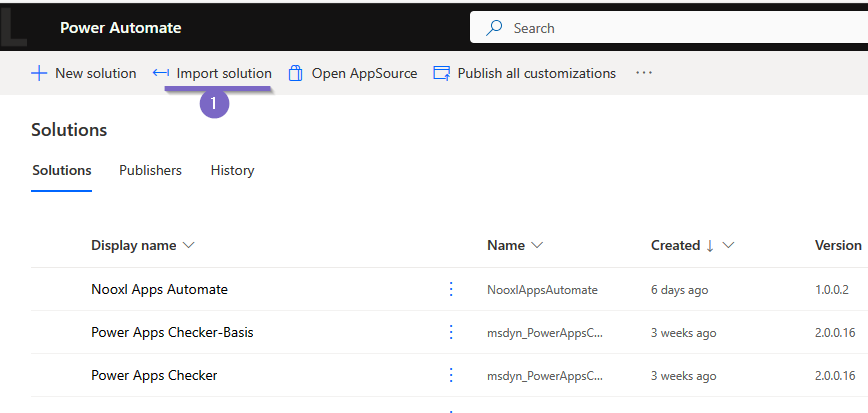
For automating a Nooxl spreadsheet model, this example solution Nooxl Power Automate Solution ZIP was created. The ZIP file can be imported into the Microsoft Power Automate cloud environment as a solution 1 and tested.
Using the Nooxl REST API in power flows
The power flow sets the necessary parameters and then calls the Nooxl REST API. The parameters are determined by the demo model used. Further details can be found at REST API "model calculate".
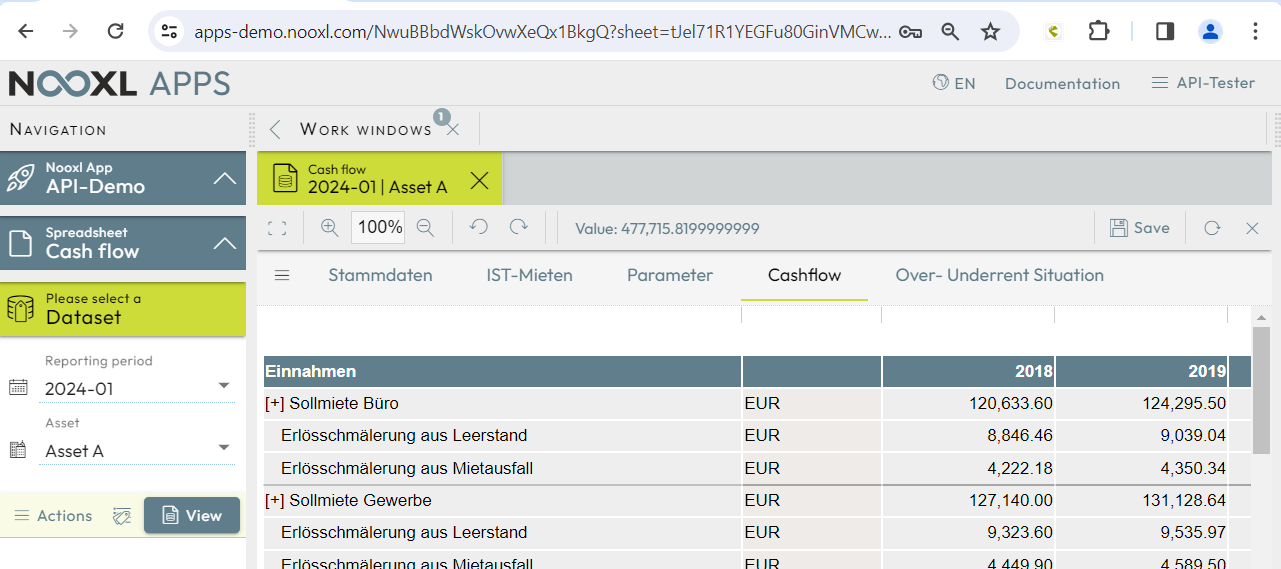
Our example flow has two parts. The first part performs an API authentication with the return of an access token, and the second part then calls a demo spreadsheet model.
Authentication
REST API "authenticate" is used for authentication.
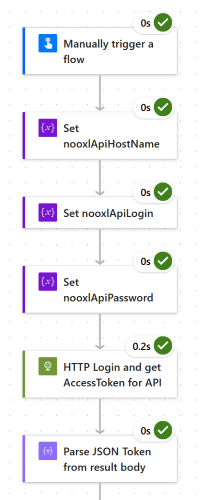
First, the parameters for the REST API "authenticate" are set. For our demo they are:
    nooxlApiHostName: https://ncs-demo.nooxl.com
    nooxlApiLogin: API-Tester
    nooxlApiPassword: **ask us for the password**
After calling the REST API "authenticate", the response is
converted into a JSON object, from which the Token is then used in the next step as a JWT
'Bearer' token for authorization.
Model calculation
For the model calculation via the REST API "model calculate", further parameters are set.
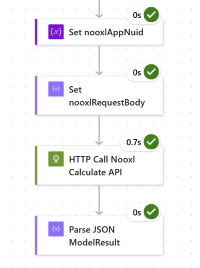
The parameters select the spreadsheet model modelName, the dataset modelSelections,
specify input values dataInputs for named ranges in the model, and set the output ranges
dataOutputMarkupNames. A detailed description of the parameters can be found at
REST API "model calculate".
    nooxlAppNuid: tJel71R1YEGFu80GinVMCw

    request body:
        {
            "modelName":"Cash flow",
            "modelSelections":[
                {"dataLabelName":"2024-01"},
                {"dataLabelName":"Asset A"}
            ],
            "dataInputs":[
                {"markupName":"Usage Inputs",
                  "cellValues":[
                    ["810","16","","20.00","4%"],
                    ["245","4","","25.75","4%"],
                    ["140","1","","14.80","4%"],
                    ["950","15","","14.30","1%"]
                ]
                },
                {"markupName":"Rent Inputs",
                  "cellValues":[
                    ["20.11","3.00%"],["21.00","2.00%"],["34.70","1.50%"],["15.40","5.00%"]
                  ]
                },
                {"markupName":"Parameter Inputs",
                 "cellValues":[
                    ["1.84%"],["7.79%"],["7.53%"],["466.81"],["1.00%"],["35.00"],["2.00%"],
                    ["3.15"],["18.75%"],["2.00%"],["3.73%"],["4.29%"],["1.49%"],["0.00%"],
                    ["2.50"],["1.50%"],["5.00"]
                  ]
                }
            ],
            "dataOutputMarkupNames":[
                "Total annual revenue Outputs",
                "Total annual expense Outputs"
            ],
            "modelOptions":{
                "saveModel":false
            }
        }
With the saveModel option, the model is saved if permission is sufficient. Any actions
present in the model are triggered by this, such as creating a new version with a copy of
the data.
As a result, the values from the output ranges are returned.
{
    "dataOutputs":[
        {
            "markupName":"Total annual revenue Outputs",
            "cellValues":[
                ["477,715.82","493,584.47","502,651.10","512,028.82","521,734.43","531,788.61","542,213.04","553,030.50","564,264.85","575,941.13"]
            ]
        },
        {
            "markupName":"Total annual expense Outputs",
            "cellValues":[
                ["221,563.00","223,969.94","226,453.86","228,968.19","231,513.78","234,091.03","236,700.40","239,342.33","242,017.28","244,725.71"]
            ]
         }
    ],
    "errorCodes":[]
}
The result is turned into a JSON object in Power Flow. Individual values can then be used further as needed.